

Lightweight PDP/Cart Widget
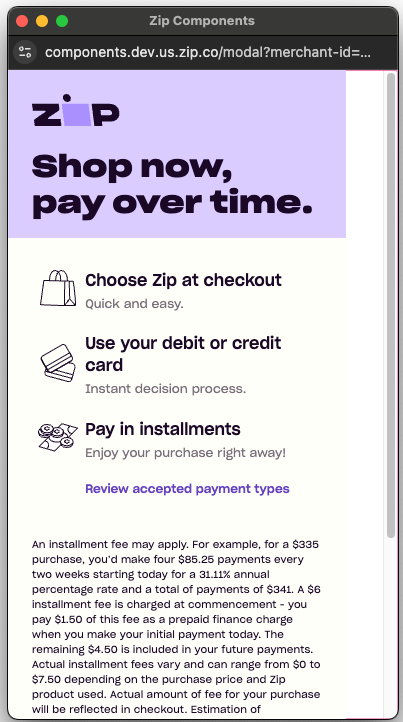
Our No SDK JavaScript PDP/Cart Widget allows your customers to easily see their ability to split their purchase amount into 4 easy payments, as well as additional information regarding their installment plan and Zip's terms and conditions.
This widget can be loaded on your site with a popup browser (window.open) or embedded in an <iframe /> element.
- Sandbox: https://components.sand.us.zip.co/modal
- Production: https://components.us.zip.co/modal
1. Enable display of the widget and modal
Paste this snippet which renders the Zip Widget and informational modal in the store's theme or global file.
For each placement, update the amount attribute (e.g. for Shopify use {{ current_variant.price }}) with the variable for the product price or cart total and the merchantId attribute with the unique merchant id associated with your Zip integration.
<!-- zip.js Library -->
<script>
  const baseUrl = "https://components.us.zip.co/modal";
  const merchantId = <YOUR MERCHANT ID>; // provided by the Zip integrations team.
  const amount = <PRODUCT / CART AMOUNT>;
  function openPopup() {
    // center the popup in the middle of the parent window
    const w = 390; // recommended values
    const h = 650; // recommended values
    // we are certain window.top will exist
    const x = window.top.outerWidth / 2 + window.top.screenX - (w / 2);
    const y = window.top.outerHeight / 2 + window.top.screenY - (h / 2);

    // open the popup
    window.open(`${baseUrl}?merchant-id=${merchantId}&amount=${amount}&force-wbfd=Y`, "_blank", `noopener,noreferrer,popup=true,width=${w},height=${h},top=${y},left=${x}`);
  }
</script>
SandboxIf implementing the widget in a sandbox environment, use the following sandbox URL:
2. Place the widget
Paste this snippet where the Zip Widget should appear. We recommend the following:
- Beneath the product price on the Product Detail Page
- Beneath the cart total on the Cart page
- Beneath the cart total on the Mini Cart page
<!-- Insert Zip Widget -->
<a onClick="openPopup();" style="text-decoration: underline; cursor: pointer">Learn More</a>
Customization
The following query parameters should be provided in the query string to configure the widget for your customer:
| Attribute name | Value type | Optional/Required | Details |
|---|---|---|---|
merchant-id | string | Required | The merchant unique Id provided by Zip. |
amount | number | Required | The price of the product. |
currency | string | Optional | The currency in which the customer is transacting, in ISO 4217 format. (Ex.USD) |
force-wbfd | boolean | Optional | Set to Y if utilizing the customer installment fee structure. (Options are Y or N) |
Preview
Need help?If you would like information about advanced customization or have any questions, please email our Merchant & Partner Solutions team.
Updated about 1 month ago