---
updatedAt: 2026-09-04T11:22:19.000Z
agentTools:
projectIndex: https://docs.us.zip.co/llms.txt
---
# Shopify
# Overview
Zip offers an integration that allows Shopify merchants to offer Zip Pay in 4 to their customers.
If you don't have a merchant account with Zip, please navigate to [Zip for Business](https://zip.co/us/for-businesses) to become a merchant partner. Once you've become a Zip merchant partner, you can refer to this guide as you integrate via the Zip onboarding flow.
If you've previously been a Zip partner or are encountering technical issues, please utilize this guide or contact [Partner Support](mailto:partners@us.zip.co) for assistance.
Follow the steps in this guide to integrate Zip into your Shopify store.
1. [Integrate the Widget](https://docs.us.zip.co/docs/installing-the-zip-on-site-messaging-app)
2. [Add the Payment Gateway](https://docs.us.zip.co/docs/add-the-payment-gateway-united-states)
# Issuing Refunds
Issuing refunds for Zip orders is straightforward with the following instructions.
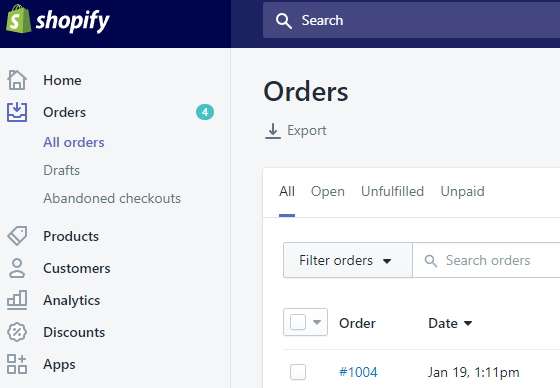
1. Locate the Zip order you would like to issue a refund for.
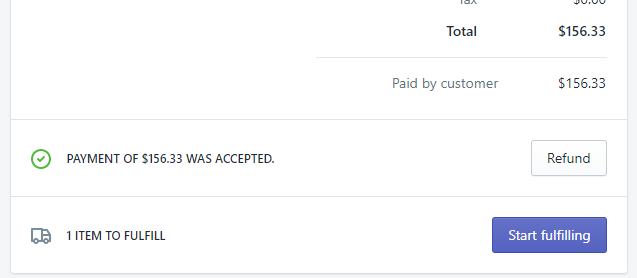
2. Click **Refund** on the Order Details Page.
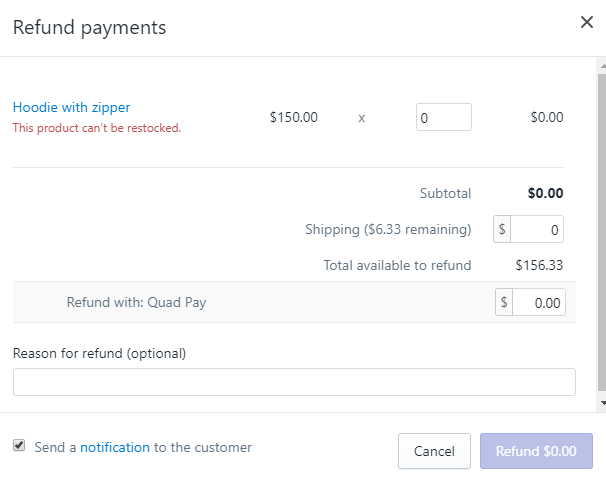
3. Enter the Refund Amount and Reason.
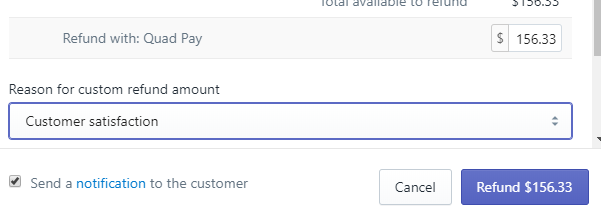
5. Click the **Refund** button. Zip will automatically credit the customer's existing and/or future installments as needed.
6. Verify the order status in Shopify and also in the [Zip Merchant Portal (staging environment)](https://merchant.sand.us.zip.co/).
> 📘
>
> If the online store doesn't handle issuing refunds directly, the [Zip Merchant Portal](https://merchant.us.zip.co/) can be configured to issue refunds. Contact [Partner Support](mailto:partners@us.zip.co) to learn more.
# Matching Zip and Shopify Orders
When an order is placed through Shopify, an ID called the **Payment ID** is set on the order. You can find this ID in Shopify, in the order Timeline section. Navigate to the Timeline event that says "A $X USD payment was authorized on Zip (US)," then expand the "Information from the gateway" section to reveal the Payment ID.\
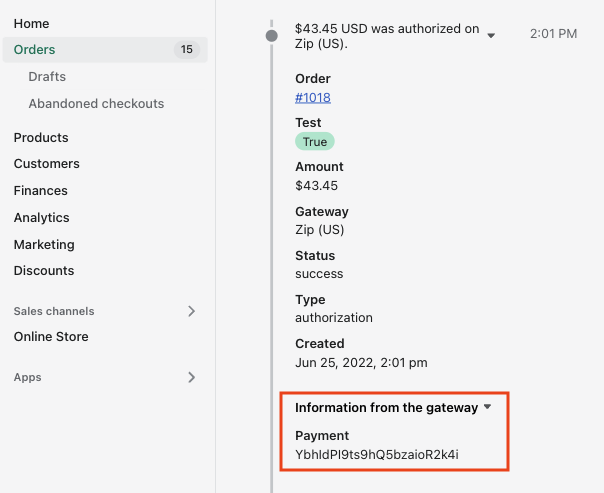
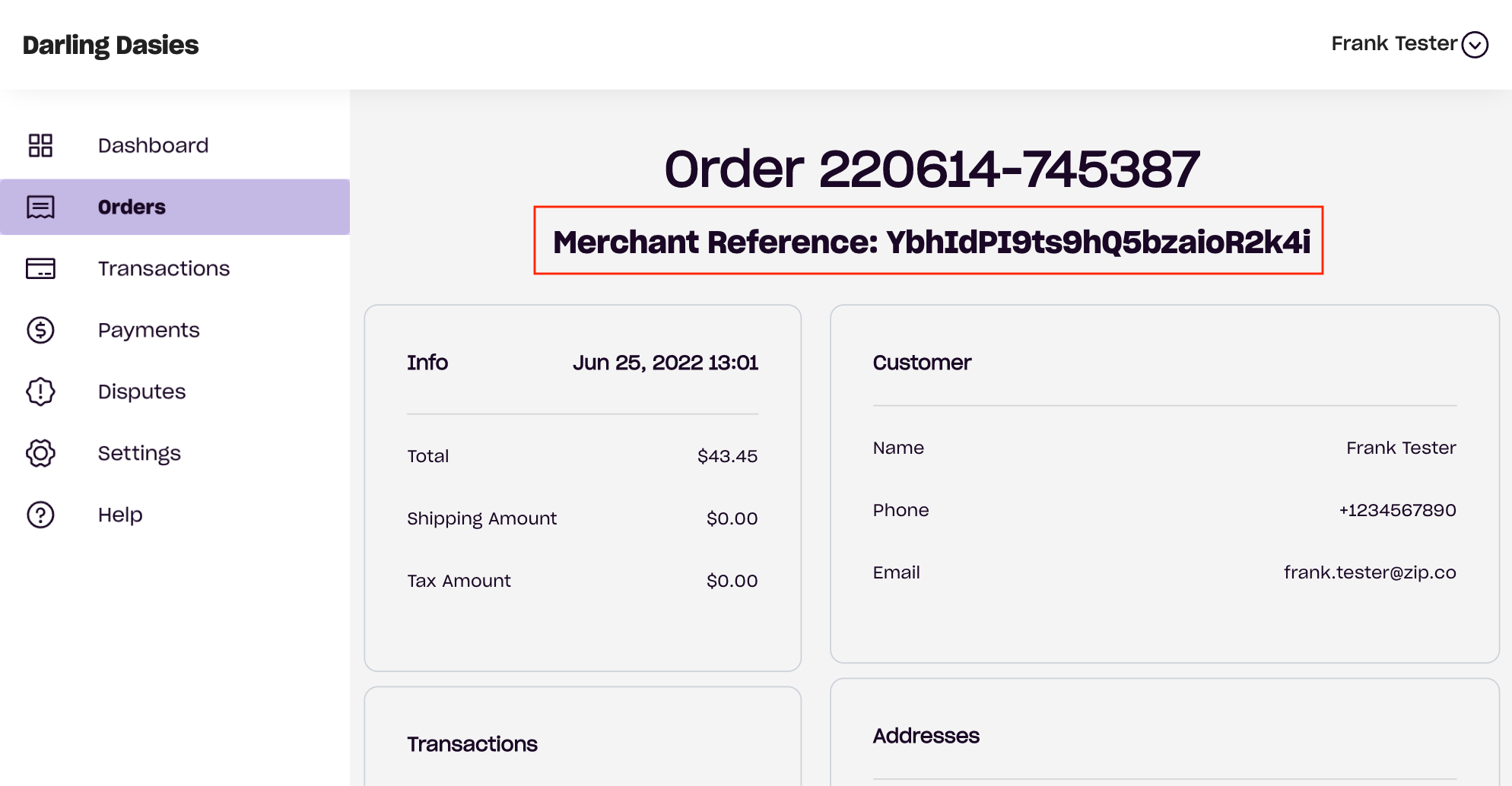
The Payment ID is the same as the **Merchant Reference** value found in the Orders section of the [Zip Merchant Portal](https://merchant.us.zip.co/).
> 📘 Note
>
> Shopify does not provide Zip with the Shopify *Order* Id. You will need the Shopify *Payment* Id in order to associate Shopify and Zip orders.
## Find Orders in Shopify with a Zip Order Number
1. To find the corresponding Shopify order from a Zip order, find the **Payment ID** in the **Merchant Reference** field in the [Zip Merchant Portal](https://merchant.us.zip.co/) or via the Zip Reporting API.
2. From your Shopify admin, go to [Orders](https://www.shopify.com/admin/orders).
3. [Search using the custom term](https://help.shopify.com/en/manual/orders/search-view-print-orders#filter-orders-using-custom-terms)**receipt.payment\_id:** and the Payment ID value.
For example: **receipt.payment\_id:xxx**.
4. Click on the order.
5. To verify the gateway and payment information, click on the specific event in the Shopify order Timeline. For more information, refer to [View payment events from the Timeline](https://help.shopify.com/en/manual/orders/manage-orders#view-an-orders-timeline).
## Reconcile Zip and Shopify Orders
When reconciling a large number of orders between Zip and Shopify, you can use the Payment ID.
1. From your Shopify admin, go to [Orders](https://www.shopify.com/admin/orders).
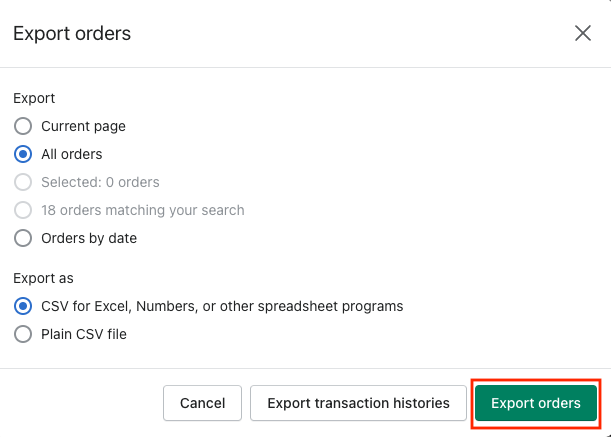
2. Click Export, choose the order range to export, and then click the "Export orders" button.
3. Download the selection of transactions to reconcile in the [Zip Merchant Portal](https://merchant.us.zip.co/) or Reporting API
4. Match the **Payment ID** from the Shopify order export to the **Merchant Reference** value in the Zip export.